How do I update my Stargate?
Every time your ESP32 starts up, it automatically checks whether a new firmware version is available. You don't need to do anything except click Update if prompted. Once the update is complete, the ESP32 will reboot automatically.
Can I order you a gate?
Depends on the moment — sometimes yes, sometimes not. Easiest is just to ask on the Discord.
Can I assemble a gate without giving you any money?
Short answer: Yes.
Long answer: Yes, because you can still create your own MQTT broker for free and connect Stargates to it — but you won't be able to connect to the whole network, more like a LAN.
The voluntary donation to join the official network is kept close to nothing — it allows gates to share their addresses publicly on the website, pays for the dedicated server that lets them communicate, and funds future features (physical DHD, new Stargate models...). If you want to support the project, you can do so at buymeacoffee.com/opengateproject!
Which gate should I build first?
Depends on your printer, budget, and how much soldering/assembly you want to take on. The Tutorials page rates every model on print difficulty, assembly difficulty, and material cost — worth a look before you commit to one.
As a rule of thumb: Orlin is the smallest and easiest build by far (great first gate) ; SG-1 (Basic) and Tollan sit in the middle ; Atlantis (Pegasus) and SG-1 (motorized) ask more of you — the motorized ring in particular adds real electronics and assembly work on top of everything a static gate needs.
Size is a separate choice from difficulty. The Pegasus ring comes in three: ~15cm (Atlantis), ~20cm (Pegasus V2) and ~30cm (Pegasus Medium). The two larger ones are almost the same build and share one tutorial — bigger mostly means more filament and more LED strip, not a harder assembly.
What is the SG1_basic gate?
The SG1_basic is a minimalist version of the SG-1 Stargate. Like the off-world gates seen in the series, the ring does not rotate. Instead, it only features LEDs for the chevrons and the event horizon.
It was originally designed while working on a version with a rotating glyph ring, but it also serves as a way to test compatibility between 36-glyph and 39-glyph Stargates.
What's the difference between SG-1 (Basic) and SG-1 (motorized)?
Functionally, they're the same gate on the network — same address, same DHD, same everything from the outside. The difference is entirely physical: the Basic version lights up chevrons directly like an off-world gate, while the motorized version has an actual NEMA17 stepper turning the glyph ring, the way the "real" Stargate does.
The motorized ring adds a driver board, wiring, and a calibration step (ring direction and speed can both be tuned from the DHD's Motor Calibration panel — no rewiring needed if the ring turns the wrong way). It's a meaningfully bigger build; see the Tutorials page for the difficulty comparison.
How do I place the glyph ring correctly?
There are 2 ways to dial:
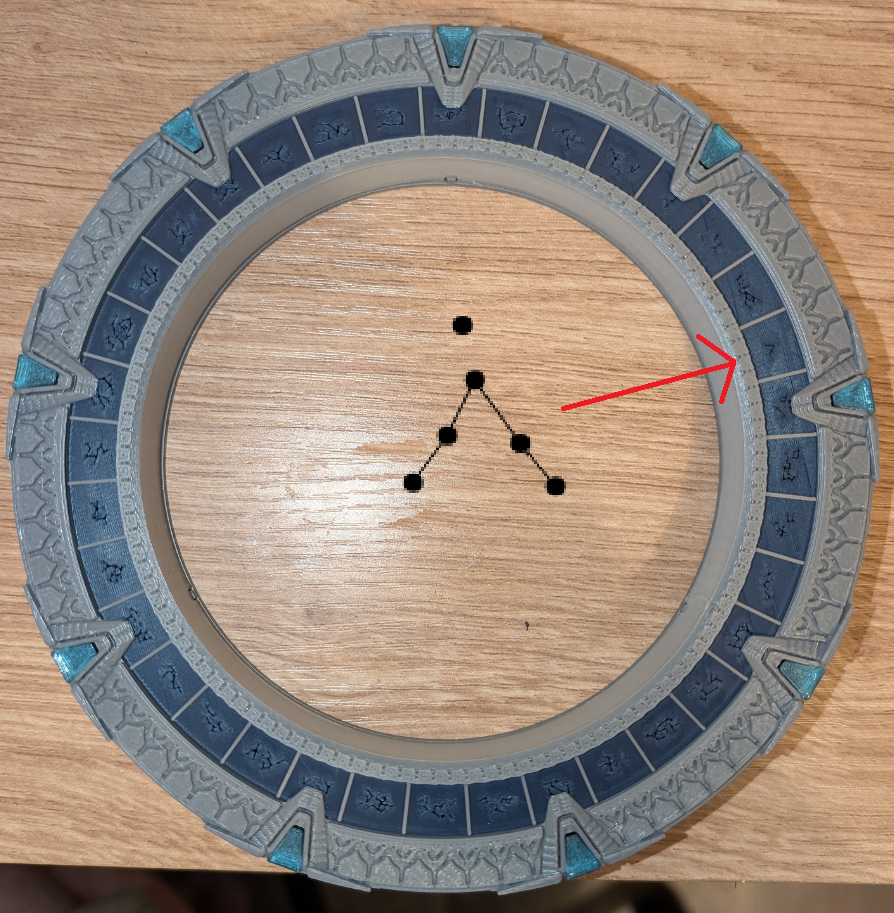
- Canonical mode: lights up the symbol under the chevron — the position of the glyph ring doesn't matter.
- Alternative mode: lights up the selected glyph directly — if you want your glyph ring to be perfectly aligned, you need to put the Earth symbol at the 8th position.
If your gate is already assembled and your glyph ring isn't correctly placed, you can use the calibration tool to correct this.
My gate boots with blinking red chevrons and does nothing else — what's wrong?
That's a safety guard, not a crash: the firmware you flashed doesn't match the gate type your board has already registered in memory (for example, flashing an Atlantis build onto a board that previously ran as SG-1). Re-flash the correct build for that gate, or erase the ESP32's flash storage to let it register fresh — either clears it.
I ordered a PCB V2 or V3 instead of the V1 — does it work the same?
Yes. Same ESP32, same DFPlayer Mini, same sound pack, same calibration, same DHD, same everything on the network. The only thing that changes is how many LED strips the board can drive.
PCB V1 has three LED outputs (chevrons, glyphs, event horizon) and is the only one that can feed three separate strips. PCB V2 and V3 have a single output, for one continuous strip that snakes through all three zones. V3 is simply V2 with an AC/DC barrel jack instead of USB-C.
If you wired one continuous strip, pick Single LED strip on the Flash a Gate page instead of Multiple LED strips — that's the whole difference, and it's a dropdown, not a different firmware. On a V1 with a single strip, plug it into the chevron output specifically: that's the pin the single-strip build drives.
Full breakdown on the BOM / PCB compatibility table.
Can a 36-glyph Stargate dial a 39-glyph Stargate?
Yes. By default, all addresses are assigned using only the first 36 glyphs, ensuring compatibility between every Stargate.
On SG-1 (or any other 39-glyph Stargate), you'll be able to enable an option to use the three additional glyphs in addresses. If this option is enabled, 36-glyph Stargates will no longer be able to dial that gate.
What's the difference between 7, 8, and 9-symbol addresses?
- 7 symbols: dials within the same cluster — a shared namespace like "Pegasus", or any custom cluster name you set. Only gates in that same cluster can be reached.
- 8 symbols: dials globally, independent of cluster — reaches any gate on the network regardless of which cluster it belongs to.
- 9 symbols: also a precise, global address, functionally close to 8 symbols — it's mostly there for the lore (9-chevron addresses are the "prestige" long-distance dial in the show).
What happens if two gates end up with the same address?
Handled automatically, nothing for you to do. Every gate checks the network's registry for collisions shortly after booting — if its address (7, 8, or 9-symbol) turns out to already be taken, it draws a new one and re-subscribes on its own. This is also why two gates that lose power at the same time and reboot together won't collide: each one waits a short random delay before checking, so their checks don't land at the exact same moment.
Can I rename my cluster, or move to a different one, later?
Yes, any time, from the web interface — no reflash needed. Moving to one of the built-in clusters (like "Pegasus" or "MilkyWay") is always free; creating your own custom cluster name unlocks at level 7.
Only your 7-symbol address changes when you move cluster (it's redrawn if it happens to already be taken in the new one) — your 8 and 9-symbol addresses stay exactly the same, since those don't depend on cluster.
How can I make my Stargate address public?
From the web interface, you can choose to make your Stargate address public and assign it a public name.
Your Stargate will then appear on the public directory. You can also choose whether the listing shows your global 8-chevron address, or your 7-chevron address plus your cluster name.
Your address remains listed whether your Stargate is online or offline. If you no longer want it to appear, simply uncheck the Public option in the web interface.
What are levels, and what do they unlock?
Your gate levels up as you use it, from Level 0 to Level 10. Features unlock gradually rather than all at once, so a brand-new gate stays simple and gains depth as you actually use it. Progress is stored on the ESP32 itself — there's no account, and nothing is tied to the network.
What each level unlocks:
- Level 1 — Iris (block incoming wormholes)
- Level 2 — Chevron colour
- Level 3 — Glyph colour, and the Midway Station
- Level 4 — Event horizon colour
- Level 5 — DHD themes, and alternative dial mode
- Level 6 — Favorite addresses, and sound packs
- Level 7 — Custom cluster names
- Level 8 — Free colour picker (any colour, not just presets)
- Level 10 — 9-symbol addresses
How you earn XP:
- 100 XP per successful dial, once a wormhole is actually established — capped to one reward every 2 minutes, so redialling in a loop won't farm it
- 5 XP every 15 seconds while a wormhole is open
- 2 XP per message sent
- 200 XP for breaking free of P3W-451 with an EMP charge
XP needed per level:
| Level | 1 | 2 | 3 | 4 | 5 | 6 | 7 | 8 | 9 | 10 |
| XP | 100 | 300 | 600 | 1000 | 1600 | 2400 | 3400 | 4600 | 6000 | 8000 |
Don't want to wait? See the next question — everything can be unlocked immediately.
I don't like the XP system. Can I unlock everything or reset my progress?
Yes! You can use the following cheat codes by dialing these addresses:
- Unlock everything:
24 4 19 9 5 6 11 - Reset XP (back to Level 0):
6 10 12 15 18 5 14 7
What is the Midway Station?
The Midway Station is a shared communication space that works like a public chat room.
Dial the following address to join it: 18 10 20 25 13 1 5 12
What is the Solar Flare event?
A solar flare mimics the eruptions seen in the show: whatever you send through gets displaced in time and space. Dial 1 2 3 5 8 13 21 34 and the wormhole opens normally — but it only holds for 3 minutes, and anything you send is redirected to a random online gate, delivered anywhere from 5 minutes to a few days later.
This works for naquadah too — send some through the "Send Naquadah" button while connected to a flare, and it'll land in a random gate's balance once it arrives, not necessarily yours.
There's also a small chance that any normal dial gets caught in a flare instead of reaching its intended target — you'll know it happened if your log shows a solar flare warning.
What is Naquadah, and how do I earn it?
Naquadah is a resource your gate slowly refines just by staying online and connected to the network — the longer your uptime streak runs, the faster you earn it. Your balance and total lifetime earnings are visible on your own DHD, and on the public leaderboard.
You spend it at the Trading Post, and can send it directly to whoever you're connected to with the "Send Naquadah" button.
What can I buy at the Trading Post?
Dial 2 4 6 8 10 12 14 and a menu appears in your message log. On offer: cosmetic skins, a gate address (usually another player's — occasionally a hidden naquadah deposit scattered somewhere on the network), a supply cartridge (a gamble: naquadah, XP, a skin, an EMP charge, or a breach that costs you some naquadah), EMP charges, Distress Signal charges, and naquadah boosters (temporarily boost your own earning rate, your whole cluster's, or the entire network's).
EMP and Distress Signal charges are stored on your gate and used later from their own dedicated buttons — no need to dial the Trading Post again each time.
What is Exploration?
Your gate isn't only something other players dial — it's also a way out. Every week the server draws a board of worlds, each at its own address. Dial one, and once the wormhole is open you can send a team of explorers through. They come back hours later with naquadah, XP, sometimes a new recruit or a cosmetic border — or empty-handed, and occasionally one short.
Everything lives in the Exploration panel of your DHD page. Teams run on the server, not on your gate: a mission keeps running while the gate is unplugged, and the gate opens on its own when the team comes home.
How does a week of missions work?
The board renews every Monday (ISO week) and is the same for every player — you're all looking at the same worlds. There are 5 listed worlds, plus 3 hidden ones whose coordinates have to be bought.
Each world has a type (military, science or exploration), a difficulty from 1 to 5, and a duration of 6, 12, 24, 48 or 72 hours. Last week's addresses lead nowhere, so a mission board is worth acting on while it's live.
How do I get explorers?
Train them from the Exploration panel. You name each one, pick a speciality, and choose how much naquadah to put into their training — between 25 and 100 Nq. Paying more doesn't buy a fixed result: it raises the odds of more skill points, and of those points spilling outside the speciality into genuine versatility.
Training takes 2 hours, and your crew size is capped at 2 + your level, up to 6. You can train several at once — if the Train button is greyed out, your crew is simply full, not busy.
Lost everyone? The next volunteer steps forward for almost nothing (10 Nq). Being wiped out sets you back, it doesn't end you.
What are teams, and why not just pick people each time?
A team is a named group of 2 to 4 explorers that you form once, equip once, and then send with a single button. You can keep up to 3 teams, and moving someone between teams is free and instant — experimenting with compositions costs nothing.
Once a team is ready, the Send team button sits right next to the DHD controls, beside M.A.L.P. and EMP. That's the point of the whole thing: Exploration is where you prepare, the DHD is where you act.
A team needs at least 2 available members to step through. If someone is in training, injured or already away, the refusal says exactly who is holding the team back.
How do I actually send a team?
Dial the world first. A team cannot step through a closed gate — this is checked on the server, so a guessed address gets you nowhere. Compose the mission address, wait for the wormhole, then press Send team.
Sending costs naquadah: a flat 40 Nq plus 6 Nq per skill point you put through the gate. A strong team is more likely to succeed and more expensive to deploy — that's the trade.
You can have 2 teams out at the same time, no more.
What is a M.A.L.P. probe for?
It's reconnaissance, and it is the difference between a calculated risk and a blind one. Send a M.A.L.P. (80 Nq) through an open wormhole and it reports what's on the other side before you commit anyone: the world's hazard, and its character.
Two hazards can be waiting. An unbreathable atmosphere kills the team outright unless they carry hazmat suits. A gate in orbit simply cannot be stepped through — the launch is refused, and nothing is charged.
Send a M.A.L.P. into another player's gate instead and it tells you whose it is. They keep the probe — unless their iris is closed. Your own team brings its probe home at the end of a mission, so it isn't lost, except on an emergency return.
What can a team carry?
Up to 3 pieces of equipment per sortie, bought from the Exploration panel and consumed when they step through — whether they turned out to be needed or not. The M.A.L.P. is the exception: the team brings it back.
- Hazmat suits (150 Nq) — survive an unbreathable atmosphere.
- Locator beacon (60 Nq) — a straight bonus to the odds of success.
- Field rations (45 Nq) — the team comes back a quarter earlier.
- Field medkit (90 Nq) — on a lethal world, one explorer makes it home instead of nobody.
- M.A.L.P. probe (80 Nq) — reconnaissance, see above.
What are world traits?
Beyond its type and difficulty, a world can have a character of its own — revealed by a M.A.L.P. survey, not by opening the gate. Roughly half the worlds have one.
- Naquadah vein — double the naquadah on success.
- Ancient ruins — far less naquadah, but the team carries back a cosmetic border for your gate.
- Inhabited — a far better chance of coming home with a new recruit.
- Hostile — failure can injure, and here alone it can kill.
- Time dilation — the mission takes anywhere from half to double its stated duration.
This is why reconnaissance pays for itself: the same difficulty-3 world is a very different proposition with a naquadah vein than with a hostile population.
What happens if a mission fails?
You get nothing, and the team still comes home more experienced — failure is never wasted. But it isn't free either: roughly one failure in four sends someone to the infirmary for 12 hours. An injured explorer is unavailable, not lost.
On a hostile world those odds roughly double, and that is the only place where failure can actually kill. Surveying first is how you find out which kind of world you're dealing with.
What are the hidden worlds, and how do I reach them?
Three of the eight worlds each week are unlisted — they don't appear on the public board at all. Their coordinates are sold at the Trading Post for 110 Nq, one at random among those you don't already have.
They're harder than the listed ones and pay substantially better. The server checks that you actually bought the coordinates before letting anyone through, so copying an address from another player gets you nothing.
What is P3W-451?
A gate trapped in a black hole's gravity well. Dial 20 5 35 26 25 34 30 and the wormhole opens normally — but it won't disengage on its own.
You'll need to either cut power to your gate, or discharge an EMP charge (bought at the Trading Post) from the dedicated button to break free — doing the latter successfully rewards you with a burst of XP.
What is the Naquadah Breeder?
Dial 2 3 5 7 11 13 17. Deposit up to 200 naquadah, and it grows over time — +5% every 6 hours, up to double.
The catch: anyone who dials in, including someone else entirely, can claim whatever's sitting in there right then. Only deposit what you're willing to risk someone else reaching first.
What is the Tok'ra Tunnel?
Dial 11 36 25 33 14 18 29 — an asynchronous message drop. You'll always receive the last message someone left there, and you can leave your own in return, rewarded with a small amount of naquadah (once per hour per gate).
What is P3X-584?
A temporal capsule. Dial 21 15 14 7 29 35 1, pick a delay in hours, then send yourself messages or naquadah through it. Everything comes back to your own gate once the delay passes — even if you're offline when it's due, it waits for you to reconnect.
Didn't find your answer? Ask on the Discord.